GERP ODOO Course
Completed
Accounting
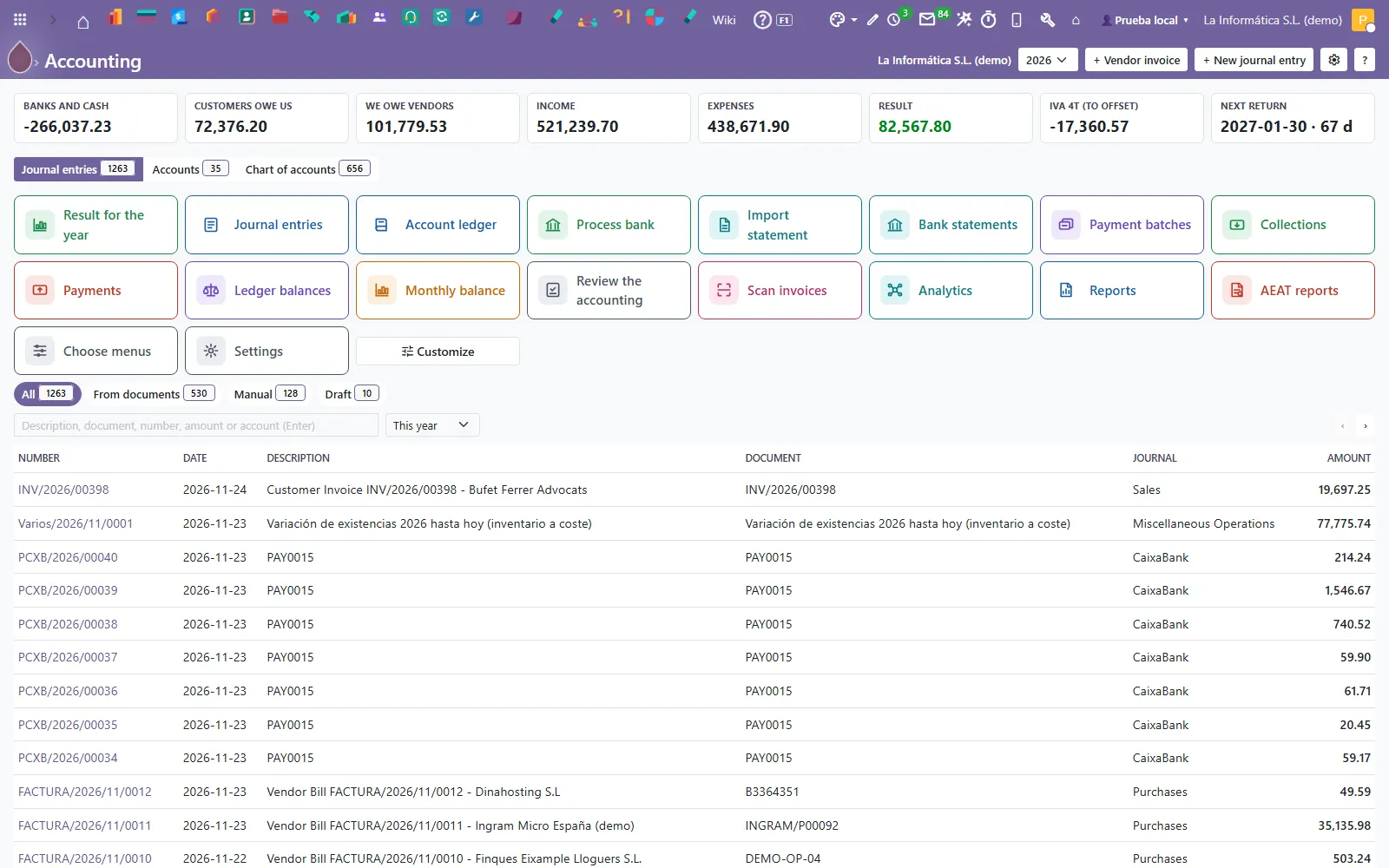
The accounting dashboard: banks and cash, what we are owed and what we owe, ledger, reconcile the bank, collections and payments, profit and loss, review and the year's result with Excel and PDF.
Video course with Ximena and Marc
Press «Empezar» (Start) and turn the volume up: they show you with voice-over and subtitles (in Spanish), in about 3 minutes.
Open full screen
▶ In motion: processing the bank, step by step.
- Statement: it is downloaded from the bank (Norma 43) or arrives by itself.
- Import: the transactions go into the bank statement.
- Reconcile: each movement is matched with its invoice, receipt or account.
- Posted: the journal entry is made and the balance matches the bank.

1. Accounting dashboard
The figures at the top and a button for each task.

▶ In motion: accounting dashboard, point by point.
- 1Up-to-date balances; press a figure to see its detail.
- 2Each button is a section (given by permissions).
- 3When reconciling, choose the bank: only those with movements appear, with their logo.
- 4The list of the open section, with search box and filters.
2. Result of the year
«We win» or «We lose», the cards for sales, purchases and expenses against the previous year, the chart of sales against expenses and the month-by-month table. Press any amount for its detail by group or sub-account; it comes out in Excel with a chart, in PDF or to the printer.

▶ In motion: result of the year, point by point.
- 1The year's result and the margin.
- 2Export.
- 3Each concept against the previous year.
- 4Bars per month; the current month highlighted.
- 5Press an amount: the detail by group or subaccount appears below.
3. The bank statement
Accounting › Statement: upload the bank file and then reconcile it.

4. Pending collections
Accounting › Collections: unpaid customer invoices; click one to collect.
5. Pending payments
Accounting › Payments: unpaid supplier invoices.
6. The profit and loss
Accounting › Profit and loss: income and expenses by group.
7. The accounting review
Accounting › Check: points to review; click one to see the cases.
8. The balances
Accounting › Balances: trial balance by account.
9. The new supplier invoice
«+ Supplier invoice» button in Accounting, or scan it.
10. The new journal entry
«+ New entry» button: journal, date and debit/credit lines.
11. The accounting fiscal year
The year selector in the blue bar changes the fiscal year.
12. The accounting settings
Accounting › Settings: AI provider, key and default expense account.
Frequently asked questions
How do I see this year's profit?
Accounting › Year result: profit, cards, monthly chart and month-by-month table. Click an amount for its detail.
How do I reconcile the bank?
Accounting › Reconcile: choose the bank and match each line with its invoice or account.
How do I see a ledger?
Accounting › Ledger: search the account or partner to see its entries and running balance.
How do I import a bank statement?
Accounting › Statement: upload the bank file and then reconcile it.
How do I see what customers owe?
Accounting › Collections: unpaid customer invoices; click one to collect.
How do I see what I owe suppliers?
Accounting › Payments: unpaid supplier invoices.
How do I see the profit and loss?
Accounting › Profit and loss: income and expenses by group.
How do I check the accounting is right?
Accounting › Check: points to review; click one to see the cases.
How do I see account balances?
Accounting › Balances: trial balance by account.
How do I enter a supplier bill?
«+ Supplier invoice» button in Accounting, or scan it.
How do I make a manual journal entry?
«+ New entry» button: journal, date and debit/credit lines.
How do I change the year in accounting?
The year selector in the blue bar changes the fiscal year.
How do I set up the AI to read invoices?
Accounting › Settings: AI provider, key and default expense account.
Why can't I see Contabilidad?
If you can't see it, your internal user lacks the «contabilidad» permission: the administrator grants it in Home › Internal users.
The accounting dashboard: banks and cash, what we are owed and what we owe, ledger, reconcile the bank, collections and payments, profit and loss, review and the year's result with Excel and PDF.
There are no comments for now.