GERP ODOO Course
Completed
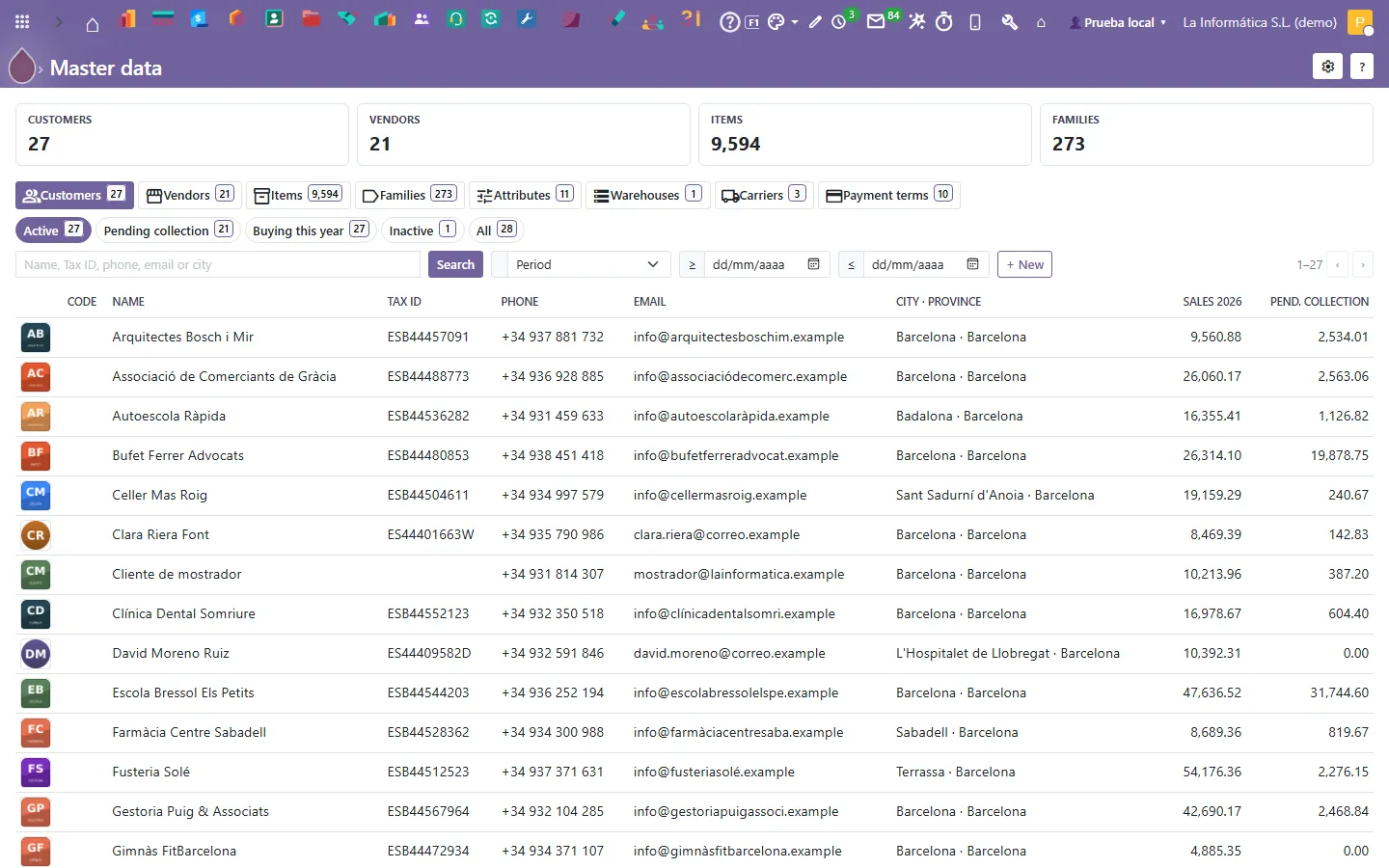
The Master data dashboard
Home › Master data. What this dashboard has, as it is in this GERP ODOO.

▶ In motion: the Master data dashboard, point by point.
- 1The Master data figures. Press one and the list that explains it opens.
- 2The buttons for what is done most. Each one is given or removed in Internal users.
- 3The tabs: each one is a list. Here it starts at «Customers».
- 4The search box searches in the open tab: name, tax ID, phone, email or city.
- 5The quick filters of the tab, with their counter.
- 6The table: ↑ ↓ to move, Enter or a click to open the row.
The figures
- Customers
- Suppliers
- Products
- Categories
The tabs
| Tab | It is searched by | Filters | Columns |
|---|---|---|---|
| Customers | Name, tax ID, phone, email or town | Active, Pending collection, Buying this year, Inactive, All | , Code, Name, Tax ID, Phone, Email, City · province, Sales 2026, Pending collection |
| Suppliers | Name, tax ID, phone, email or town | Active, Pending payment, Inactive, All | , Code, Name, Tax ID, Phone, Email, City · province, Purchases 2026, Pending payment |
| Products | Name, reference, barcode or family | Active, They are sold, They are bought, Out of stock, Inactive | , Reference, Name, Category, PVP, Cost, Stock |
| Categories | Family name | , Category, Products | |
| Attributes | Attribute name | Attribute, Values | |
| Warehouses | Name or code | Code, Name, Address | |
| Carriers | Name | Name, Price list, Fixed price | |
| Payment terms | Name | Term |
| ↓ from the search box | Go down to the table |
| Enter | Open the row |
| PgDn / PgUp | Skip 10 rows or a page |
| Esc | Back to Home |
Figures, buttons and tabs of Master data.
Rating
0
0
There are no comments for now.
Join this Course
to be the first to leave a comment.