GERP ODOO Course
Completed
Purchases
Requests for quotation, supplier orders, receipts of goods and supplier invoices, from the Purchases dashboard.
Video course with Ximena and Marc
Press «Empezar» (Start) and turn the volume up: they show you with voice-over and subtitles (in Spanish), in about 3 minutes.
Open full screen
▶ In motion: from a purchase order to payment, step by step.
- Order: Home › Purchases › «New order» to the supplier.
- Receipt of goods: the goods arrive: the receipt is validated and the stock goes up.
- Invoice: the supplier invoice is typed in or scanned with AI.
- Journal entry: once confirmed it is posted, with its VAT.
- Payment: paid from the Payments tab or with a remittance.
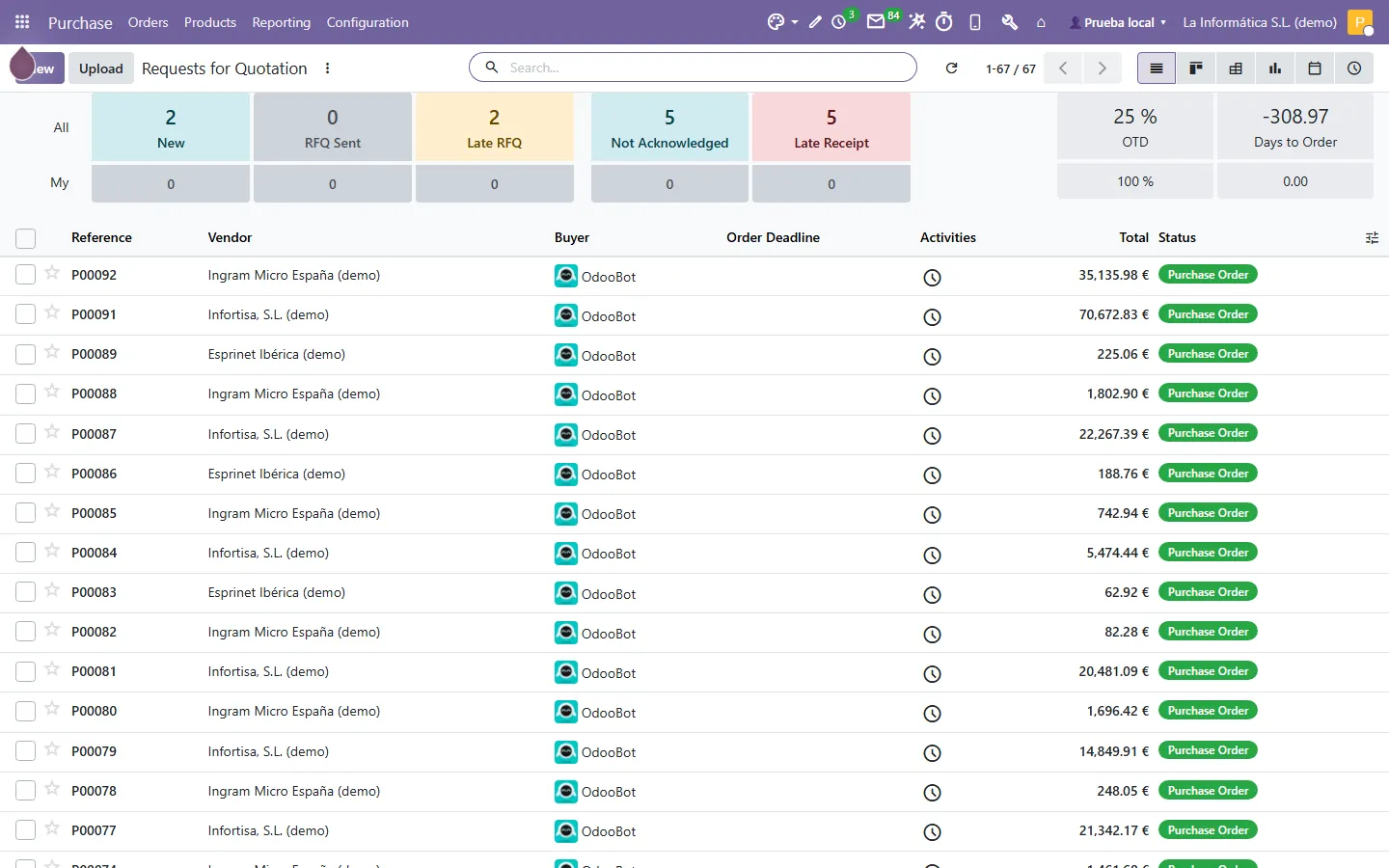
1. Purchases dashboard
New order, supplier invoice, scan invoices and suppliers.

▶ In motion: purchases dashboard, point by point.
- 1The figures of the area; press one to see its list.
- 2The buttons for what is done most (new document, scan…).
- 3The tabs: each one is a list (quotes, orders, delivery notes, invoices…).
- 4The search box searches in the open tab (number, customer, tax ID…).
- 5The quick filters of the tab with their counter.
- 6The table: press a row to open it; the eye shows the PDF in a window.
2. The requests for quotation
Purchases › RFQs.
3. The receipts of goods
Purchases › Receipts.
4. The supplier invoices
From the order or scanning.
5. Payments to suppliers
«Register payment».
6. The suppliers
Master data › Suppliers.
7. The purchase price
Purchase tab.
8. The purchases pending receipt
Panel figure.
Frequently asked questions
How do I create a purchase order?
Purchases › «New order»: supplier and lines, «Confirm». On arrival validate the receipt.
How do I request a quote?
Purchases › RFQs.
How do I receive goods?
Purchases › Receipts.
How do I enter a supplier bill?
From the order or scanning.
How do I pay a supplier bill?
«Register payment».
How do I add a supplier?
Master data › Suppliers.
How do I set a supplier price?
Purchase tab.
How do I see what's pending?
Panel figure.
Why can't I see Compras?
If you can't see it, your internal user lacks the «compras» permission: the administrator grants it in Home › Internal users.
Requests for quotation, supplier orders, receipts of goods and supplier invoices, from the Purchases dashboard.
There are no comments for now.